Microsoft has already announced that windows server 2003 / windows server 2003 R2 versions support is coming to end in 14th July 2015 (http://support2.microsoft.com/lifecycle/search/default.aspx?sort=PN&alpha=Microsoft+Windows+Server+2003&Filter=FilterNO ).
It’s no wonder that still organizations using windows server 2003 / windows server 2003 R2 in their infrastructure with different server roles. In last few post I have covered up how we canmigrate different server roles from windows server 2003 to latest windows server 2012. This article also a part of the same series and it will explain how we can migrate DHCP server role.
For the demonstration I am using following setup
Server Name
Operating System
Server Roles
Networks
dhcp-2k3.canitpro.local
Windows Server 2003 R2 Enterprise x86
DHCP
Network A – 10.10.10.0
Network B – 172.16.25.0
Network C – 192.168.148.0
CANITPRO-DC2K12.canitpro.local
Windows Server 2012 R2 x64
-
-
dhcp-2k3.canitpro.local server currently setup with 3 additional NIC to represent network A,B and C. they have configured with static ip addresses to match with relevant network it belongs to. The DHCP server host different DHCP scopes for each network.
Backup DHCP configuration in windows server 2003 R2
1) Log in to the windows server 2003 as member of administrator group
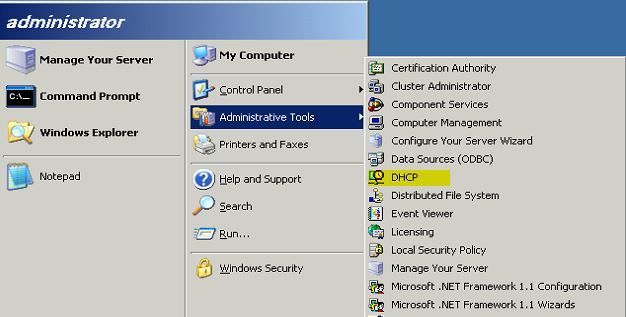
2) Load the DHCP server console Start > Administrative Tools > DHCP
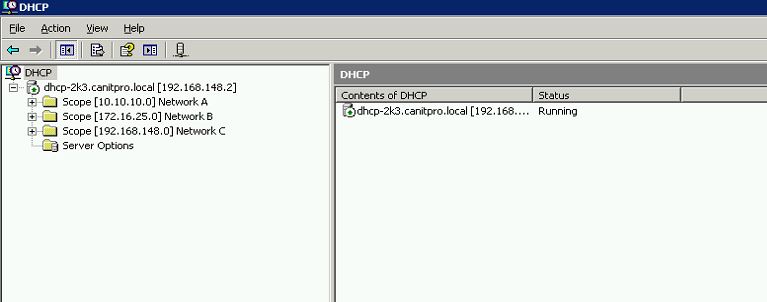
 3) In here we can see the configured DHCP scopes
 4) Now it’s time to back up the config. To do that open the command prompt using start > run > type cmd and then enter
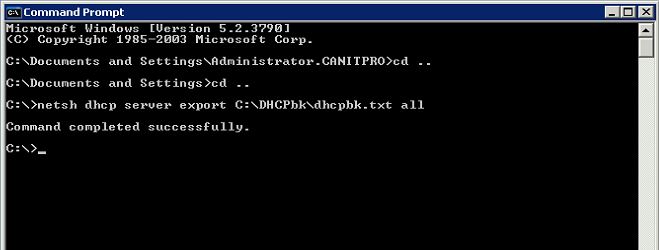
5) Then type netsh dhcp server export C:\DHCPbk\dhcpbk.txt all and press enter. In hereC:\DHCPbk\dhcpbk.txt is the file path which backup will save in to. It can change according to your requirement.
It’s no wonder that still organizations using windows server 2003 / windows server 2003 R2 in their infrastructure with different server roles. In last few post I have covered up how we canmigrate different server roles from windows server 2003 to latest windows server 2012. This article also a part of the same series and it will explain how we can migrate DHCP server role.
For the demonstration I am using following setup
Server Name
|
Operating System
|
Server Roles
|
Networks
|
dhcp-2k3.canitpro.local
|
Windows Server 2003 R2 Enterprise x86
|
DHCP
|
Network A – 10.10.10.0
Network B – 172.16.25.0
Network C – 192.168.148.0
|
CANITPRO-DC2K12.canitpro.local
|
Windows Server 2012 R2 x64
|
-
|
-
|
dhcp-2k3.canitpro.local server currently setup with 3 additional NIC to represent network A,B and C. they have configured with static ip addresses to match with relevant network it belongs to. The DHCP server host different DHCP scopes for each network.
Backup DHCP configuration in windows server 2003 R2
1) Log in to the windows server 2003 as member of administrator group
2) Load the DHCP server console Start > Administrative Tools > DHCP
2) Load the DHCP server console Start > Administrative Tools > DHCP
3) In here we can see the configured DHCP scopes
4) Now it’s time to back up the config. To do that open the command prompt using start > run > type cmd and then enter
5) Then type netsh dhcp server export C:\DHCPbk\dhcpbk.txt all and press enter. In hereC:\DHCPbk\dhcpbk.txt is the file path which backup will save in to. It can change according to your requirement.
5) Then type netsh dhcp server export C:\DHCPbk\dhcpbk.txt all and press enter. In hereC:\DHCPbk\dhcpbk.txt is the file path which backup will save in to. It can change according to your requirement.