Pages

Showing posts with label Windows 2012 R2. Show all posts

PASSWORD REPLICATION IN RODC

In RODC environment one of the great feature is the password replication. in RODC environment we can determine which passwords need to be cache in RODC and which accounts still need to be authenticate via writable domain controller. As example domain administrator accounts do not need to be cached on RODC. its always safe if it can be authaticate via routable DC for security purposes. so if a domain administrator login from a RODC enviornment, we can set system to forward the authtication request or service ticket to the writable domain controller.

Microsoft made this easy by introducing password replication policy (PRP) to RODC environment. by default system create domain-wide password replication policy two domain local security groups.
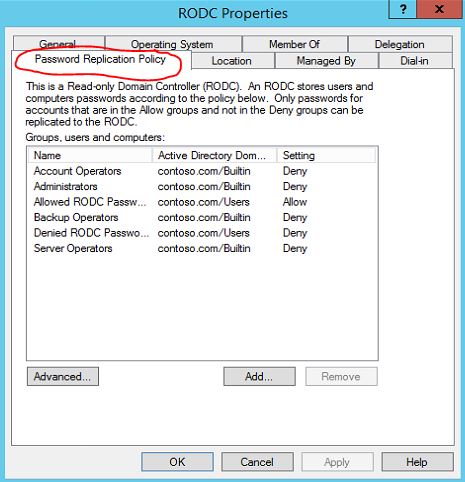
Allowed RODC Password Replication Group : Members of this group will allow to cache passwords in RODC. by default this group do not have any members.
Denied RODC Password Replication Group: Members of this group are deny to cache passwords in RODC. Some of the groups which are security critical are member of this group by default such as Administrators, Server Operators, Backup Operators, Account  Operators.
One of the biggest mistakes administrator do is only allow/deny user accounts. But computers it self also uses authatication and service tickets requests. so make sure you add computer accounts also in to these lists.
How to configure RODC password replication policy(PRP) ?
1) Login to a writable domain controller with domain administrator account
2) Open "Active Directory Users and Computers" snap in by Server Manager > Tools > Active Directory Users and Computers
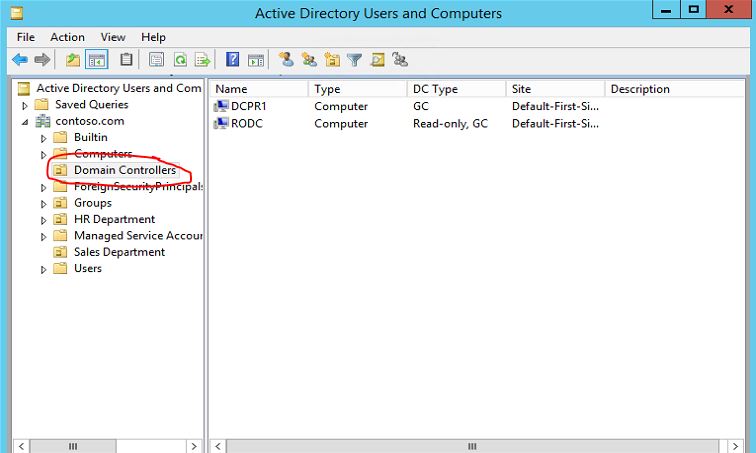
3) Go to "Domain Controllers" OU
prp1
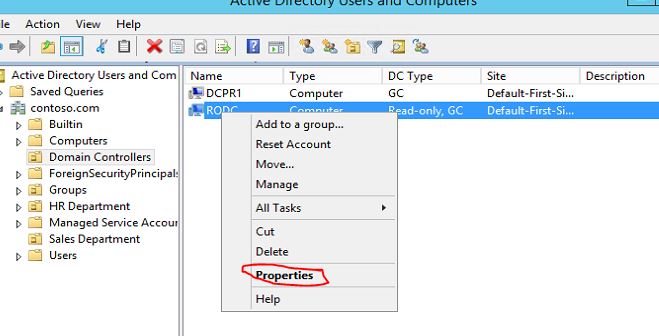
4) Click to select the RODC you need to configure PRP. Then right click and click on properties.
prp2
5) In the properties window click on "Password Replication Policy" tab
GUIDE TO MIGRATE FSMO ROLES FROM WINDOWS 2003 SERVER TO WINDOWS 2012 R2 SERVER


Even its been over decade after windows server 2003 release , It’s no wonder that still organizations using windows server 2003 / windows server 2003 R2 as their domain controllers. Microsoft has announced that windows server 2003 / windows server 2003 R2 supports ends on 2015, July 14th (http://support2.microsoft.com/lifecycle/search/default.aspx?sort=PN&alpha=Microsoft+Windows+Server+2003&Filter=FilterNO). So the day has come to plan out for the upgrades if you still running those versions in infrastructure.


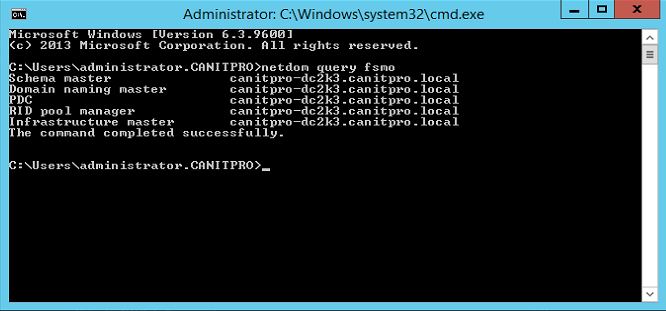
This guide will explain how we can transfer DC FSMO roles from windows server 2003 to windows server 2012 R2 which is latest. In Windows DC environment FSMO roles holds all the information about DC and its necessary to have all this 5 roles working correctly to maintain proper DC environment. The 5 FSMO roles as following,
•    Schema master
•    Domain naming master
•    RID master
•    PDC emulator
•    Infrastructure master
You can find more information about this roles from http://support.microsoft.com/kb/197132
For the demonstration I am using the following setup


Server Name
Operating System
Server Roles
canitpro-dc2k3.canitpro.local
Windows server 2003 SP2 x86
Active Directory FSMO roles, DNS
CANITPRO-DC2K12.canitpro.local
Windows server 2012 R2 x64
Additional Domain Controller, DNS
So in here I already added windows 2012 r2 server to domain and make it additional domain controller. Currently it do not hold any FSMO roles. My plan is to migrate all the FSMO roles in to windows 2012 r2 server.
role1
Note : In before if we adding windows 2008 server to windows 2003 environment, first we need to prepare the forest and domain schema by running adprep \forestprep and adprep \domainprep  from windows 2008 source files \ support \ adprep. But in windows 2012 you do not need to worry about it when adding 2012 as additional domain controller. When you run the dcpromo it will automatically update it in windows 2003 remotely.
 

RECENT ARTICLES

Recent Articles

BLOG CONTENTS