Pages

Showing posts with label Windows Server 2008. Show all posts

Import a Trusted Root Certification Authority In Windows 7/Vista/XP.

1. Start Microsoft Management Console (MMC) Tool

Click Start -> Run -> Enter 'MMC' and click 'OK'


 2. Click File -> Add/Remove Snap-In...


3. Add Certificate.

Select 'Certificates' in left panel and click 'Add' to move to right panel , Then Click 'OK'


4. Select 'Computer Account' option and click 'Next'
Guide To Install Read-Only Domain Controller (RODC)

Before install a RODC in a domain environment it need to meet the following requirements,

  • Forest function level should be windows 2003 server or higher
  • Needs at least one writable domain controller running windows server 2008 or higher
If forest have any DC running windows server 2003 we need to adjust permissions on DNS application directory partition to allow them to replicate to RODC. It can be done by running adprep /RODCprep from windows 2012 server installation disk \support\adprep folder.
In my demo setup i do have a domain called contoso. Before start lets check the forest function level.
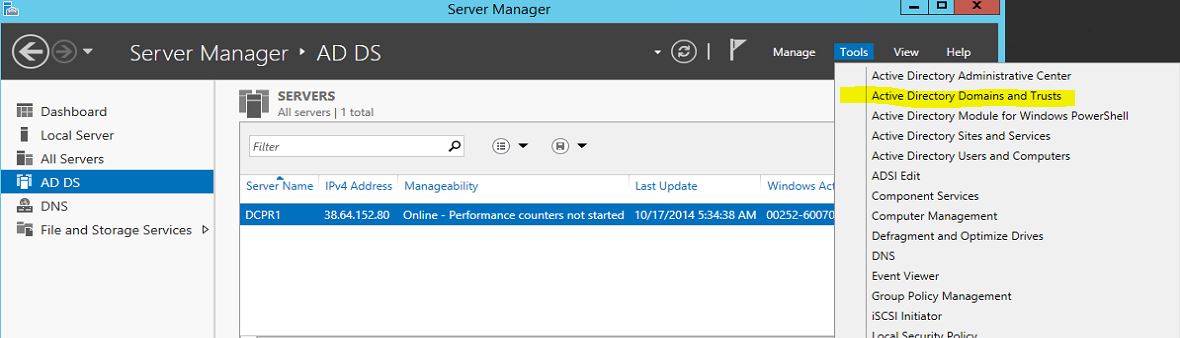
  • To do that, log in to the DC as domain admin and open "Server Manager"
  • Then from tools click on "Active Directory Domains and Trust"
rodc1
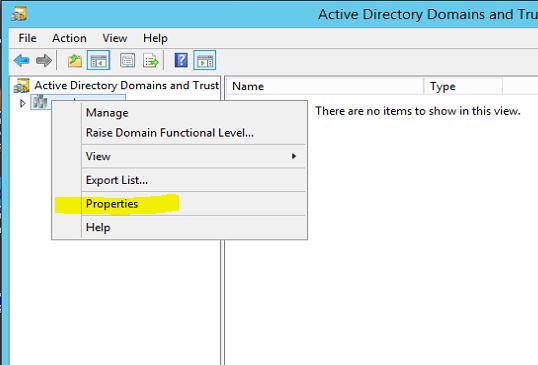
  • Right click on domain and select "Properties"
rodc2
As we can see here its runs with windows server 2012 R2 so we do not need to prepare domain

GUIDE STEPS TO SETUP ACTIVE DIRECTORY ON WINDOWS SERVER 2008

This tutorial will explain how to install AD on server 2008,as well as for windows 2008 R2.

Requirement:
Minimum: Single processor with 1.4 GHz (x64 processor) or 1.3GHz (Dual Core)
Minimum: 512 MB RAM
Minimum: 32 GB or greater
  • The first step is to assign a ip to the server that you going to deploy the AD. Its nessary to install it as DNS server too. So its better to have fixed ip it doesn't mean you cannot install AD without fixed ip address but it will solve lot of issues if you used fixed ip.
In here the server ip is 10.0.0.14. Since we going to make it as DNS server too you should use the
 

RECENT ARTICLES

Recent Articles

BLOG CONTENTS